












 GPT-powered ticket routing
 Email & WhatsApp inbox
 Sentiment detection
 1-60 min check intervals.
 Email & Google Chat alerts
 Global Checks
 Auto-trains on any URL
 Built-in lead capture
 One-line JS embed

























A court order from Germany. A federal lawsuit filed in New York. A formal notice from a French regulator. In 2026, these are the ways businesses discover their websites exclude disabled users, and none of them is a good way to find out.
Website accessibility compliance stopped being a voluntary best practice on 28 June 2025, when the European Accessibility Act became enforceable across the EU. Add more than 5,000 US accessibility lawsuits filed in 2025 alone, and the risk picture has changed for any business selling online.
This guide explains what the new rules require, who they apply to, and the practical steps that get you compliant. One note before we start: this is general information rather than legal advice, so confirm your specific obligations with legal counsel in each market you serve.
What Website Accessibility Compliance Means in 2026
Website accessibility compliance means your website works for people with visual, hearing, motor and cognitive disabilities, and meets the legal standards that now require this in your markets. In practice, that covers screen reader compatibility, keyboard-only navigation, sufficient colour contrast, captioned video and forms that clearly state what they need.
Two layers matter here. The technical layer is WCAG, the Web Content Accessibility Guidelines, which set measurable pass-or-fail criteria. The legal layer is the set of laws that reference those guidelines: the European Accessibility Act, the ADA in the US, the Equality Act in the UK and their counterparts elsewhere.
The recent shift is one of scope. Accessibility law used to bite mainly on government websites; it now applies squarely to private businesses selling online.
The European Accessibility Act: Why It Reaches Beyond the EU
The European Accessibility Act (EAA) requires e-commerce, banking, transport booking, telecoms and other consumer-facing digital services sold in the EU to be accessible, and it has been enforceable since 28 June 2025. The obligation follows the customer, not the company address.
That second point catches many businesses off guard. If your company in Mumbai, New Jersey, London, Sydney or Dubai sells to consumers in any EU member state, the EAA applies to you. Only microenterprises, meaning fewer than 10 employees and annual turnover of €2 million or less, are exempt from the service requirements.
Penalties are set nationally, and they are not trivial:
- Germany: fines up to €100,000 per violation
- Spain: tiered fines reaching €1,000,000 for the most serious infractions
- France: fines from €5,000 to €250,000, plus €25,000 per year for a missing accessibility statement
Enforcement began politely, with checklists and notices rather than headline fines. That phase is ending: authorities have filed legal notices, and private claimants in Germany started sending warning letters within weeks of the deadline. HMMBiz now treats the EAA as a live requirement for every client selling into Europe, not a future risk.
WCAG 2.2: The Standard Regulators Point To
WCAG 2.2 is the current version of the Web Content Accessibility Guidelines, published by the W3C in 2023 and adopted as ISO/IEC standard 40500 in 2025. Laws rarely spell out technical detail themselves; they point to WCAG, almost always at Level AA.
WCAG 2.2 adds nine success criteria on top of version 2.1. The most consequential for business websites:
- Visible focus indicators, so keyboard users can always see where they are
- Minimum touch target sizes of 24 by 24 pixels
- Alternatives to drag-and-drop interactions
- Accessible authentication that never relies on memorising or transcribing codes
- No forcing users to re-enter information they already provided
The practical rule is simple: build to WCAG 2.2 AA. It automatically satisfies 2.1 AA, which is what the EAA’s harmonised standard and current US regulations reference, and it will not need reworking as laws catch up.
Accessibility Rules Across the US, UK, Australia, India and UAE
Selling in several markets means overlapping laws, and the efficient answer is one standard applied once: WCAG 2.2 AA. Here is how obligations break down across the regions HMMBiz serves.
- USA. The ADA covers private businesses under Title III, and courts routinely treat WCAG as the benchmark. Plaintiffs filed over 5,000 digital accessibility lawsuits in 2025, most against e-commerce sites. Separately, state and local government entities must meet WCAG 2.1 AA under Title II from April 2027 for larger jurisdictions, following the Department of Justice’s 2026 deadline extension.
- UK. The Equality Act 2010 requires service providers to make reasonable adjustments, which regulators and courts interpret to include accessible websites. Public sector bodies are already monitored against WCAG 2.2 AA.
- Australia. The Disability Discrimination Act 1992 applies to online services, and the Australian Human Rights Commission directs complaints against inaccessible sites to WCAG.
- India. The Rights of Persons with Disabilities Act 2016 mandates accessible ICT, and government platforms follow GIGW guidelines built on WCAG.
- UAE. Federal digital government standards require accessible public services, and expectations for private platforms are rising alongside them.
How HMMBiz Modernised Regulated Workflows Without Cutting Compliance Corners
HMMBiz worked with a global pharmaceutical process automation leader whose enterprise workflow systems had to perform under strict life sciences regulation. The team modernised those systems with advanced automation and data integration built around compliance-first design. The outcome: enhanced operational visibility and faster process execution, delivered in an environment where regulators check the work.
Read the Full Case Study: Global Pharma Process Automation Leader
Would your website pass an audit it didn’t schedule?
Regulators and plaintiffs test first and notify later. HMMBiz builds and remediates websites to WCAG 2.2 AA for businesses selling across the EU, US, UK, Australia, India and UAE.
The Business Case: More Customers, Better SEO, Higher Conversion
Accessibility compliance pays for itself because it widens your market, strengthens your search visibility and removes friction for every visitor. About 1.3 billion people worldwide live with a significant disability, and together with family and friends they control an estimated $13 trillion in annual disposable income. An inaccessible checkout hands that spending straight to a competitor.
The SEO overlap is direct. Alt text, logical heading hierarchy, descriptive link text, transcripts and clean semantic HTML are accessibility fixes and ranking signals at the same time. The same structure makes your content easier for AI assistants such as ChatGPT and Perplexity to parse and cite, which is where a growing share of product research now happens.
Then there is the curb-cut effect. Captions help commuters watching without sound, strong contrast helps anyone reading a phone in sunlight, and keyboard support helps power users. Fixes aimed at disabled visitors routinely lift conversion for everyone else too.
Where Most Websites Fail
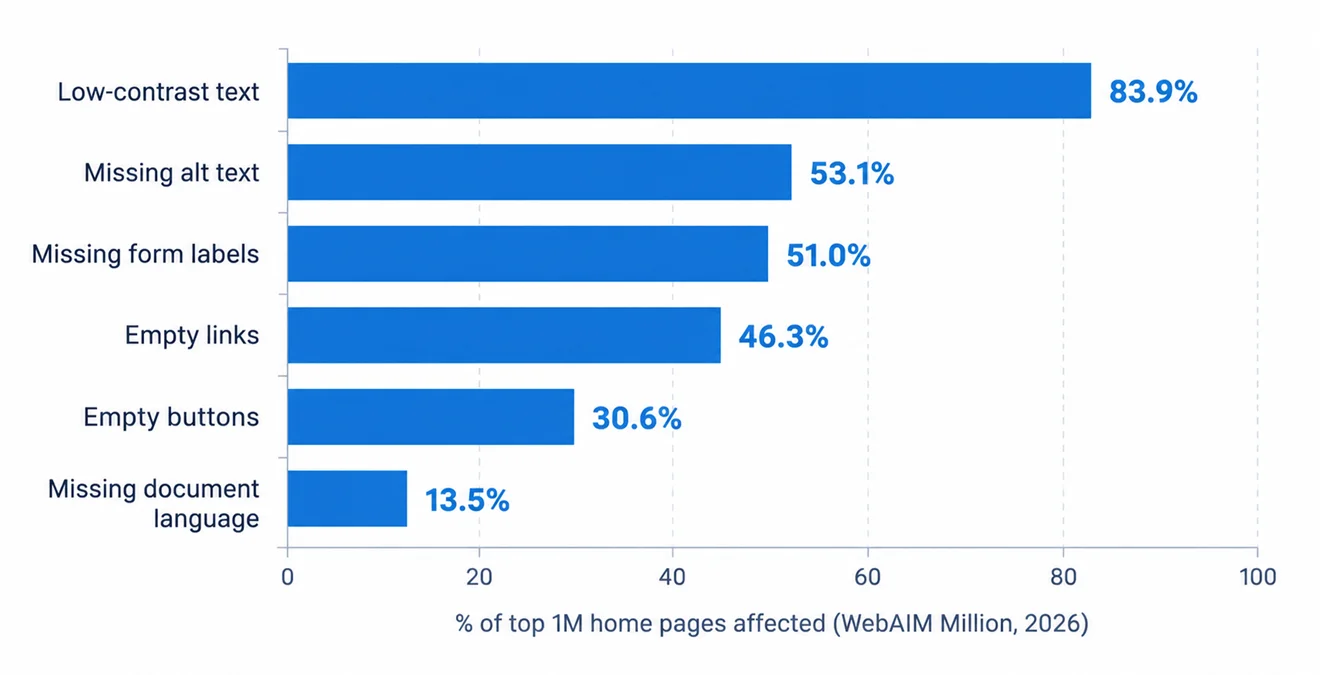
According to WebAIM’s 2026 analysis of the top one million home pages, 95.9% had detectable WCAG 2 failures, and the average page carried 56.1 distinct errors, up 10.1% in a single year.
The uncomfortable detail is that the same six error types have topped the list for years:
- Low-contrast text: 83.9% of home pages
- Missing image alt text: 53.1%
- Missing form input labels: 51.0%
- Empty links: 46.3%
- Empty buttons: 30.6%
- Missing document language: 13.5%
None of these needs exotic engineering. They are basic HTML and design decisions, which is precisely why they make such easy evidence in a lawsuit or a regulator’s notice. If your site was built without accessibility in the brief, assume several of the six are present.
Your Website Accessibility Compliance Checklist
Work through these steps in order. The early ones are cheap and reveal the true size of the job.
- Run an automated scan. Free tools such as WAVE, axe DevTools and Lighthouse flag the obvious failures. They catch only a portion of WCAG issues, so treat the results as a floor, not a verdict.
- Unplug your mouse. Navigate your key journeys, especially checkout and enquiry forms, using the keyboard alone. Wherever you get stuck, your customers do too.
- Test with a screen reader. NVDA on Windows and VoiceOver on Mac or iPhone cost nothing. Listen to your homepage and product pages read aloud.
- Fix the big six first. Contrast, alt text, form labels, empty links, empty buttons and the page language attribute account for most detectable failures.
- Close the WCAG 2.2 gaps. Visible focus states, 24-pixel touch targets, drag alternatives and login flows that never demand a memory test.
- Publish an accessibility statement. The EAA expects one, and France fines its absence.
- Bake it into your workflow. Make alt text a required CMS field, put contrast rules into your design tokens and train content editors on heading structure.
- Re-audit after every redesign. Accessibility decays as new content and features ship, so schedule quarterly checks.
If the audit surfaces structural problems buried in templates, components or checkout logic, that is work for a UI/UX design and web development team rather than a plugin. HMMBiz handles both sides: redesigning interfaces to meet contrast, focus and target-size rules, and rebuilding the underlying code so the fixes hold.
Your website already has visitors who cannot use it. That is fixable.
HMMBiz designs, builds and remediates websites to WCAG 2.2 AA for businesses that sell across borders and cannot afford a compliance surprise.
 +1 862-246-6249
FAQs
1. What is website accessibility compliance?
Website accessibility compliance means your website meets recognised standards, usually WCAG 2.1 or 2.2 Level AA, so people with disabilities can perceive, navigate and use it. It spans code, design and content: screen reader support, keyboard navigation, colour contrast, captions and clear form labels. Laws such as the European Accessibility Act and the ADA make this a legal requirement rather than a preference.
2. Does the European Accessibility Act apply to businesses outside the EU?
Yes. The EAA applies to any business selling covered products or digital services to consumers in the EU, regardless of where the company is based. An Indian SaaS firm, a US retailer or an Australian bank serving EU customers all fall within scope. Only microenterprises with fewer than 10 employees and turnover of €2 million or less are exempt from the service requirements.
3. How is WCAG 2.2 different from WCAG 2.1?
WCAG 2.2 adds nine success criteria to WCAG 2.1 and retires one (4.1.1 Parsing). The additions focus on visible focus indicators, minimum target sizes, alternatives to dragging, reduced repeat data entry and authentication without memory tests. Anything that passes WCAG 2.2 AA also satisfies 2.1 AA, which is why building to 2.2 covers both.
4. What are the penalties for accessibility non-compliance, and what deadlines apply?
EAA penalties vary by country: Germany can fine up to €100,000 per violation, Spain up to €1 million, and France adds €25,000 per year for a missing accessibility statement. The EAA has been enforceable since 28 June 2025, so no grace period remains for consumer-facing digital services in the EU. In the US, private businesses face ADA Title III lawsuits today, while larger state and local government entities must meet WCAG 2.1 AA from April 2027.
5. How much does website accessibility compliance cost, and how long does it take?
A professional audit of a small to mid-sized website typically takes one to two weeks, with remediation running four to twelve weeks depending on how deep the issues sit in the code. Cost scales with page templates, custom components and third-party integrations rather than raw page count. HMMBiz scopes remediation after the audit, so you pay for the fixes your site actually needs.
6. Do accessibility overlay widgets make a website compliant?
No. Overlay widgets sit on top of your code and cannot repair missing form labels, broken keyboard navigation or an inaccessible checkout, and businesses using them are still sued regularly. Genuine compliance requires fixing the underlying HTML, design and content. HMMBiz recommends code-level and design-level remediation, followed by monitoring so new content stays compliant.
 Table of Contents