











 GPT-powered ticket routing
 Email & WhatsApp inbox
 Sentiment detection
 1-60 min check intervals.
 Email & Google Chat alerts
 Global Checks
 Auto-trains on any URL
 Built-in lead capture
 One-line JS embed

























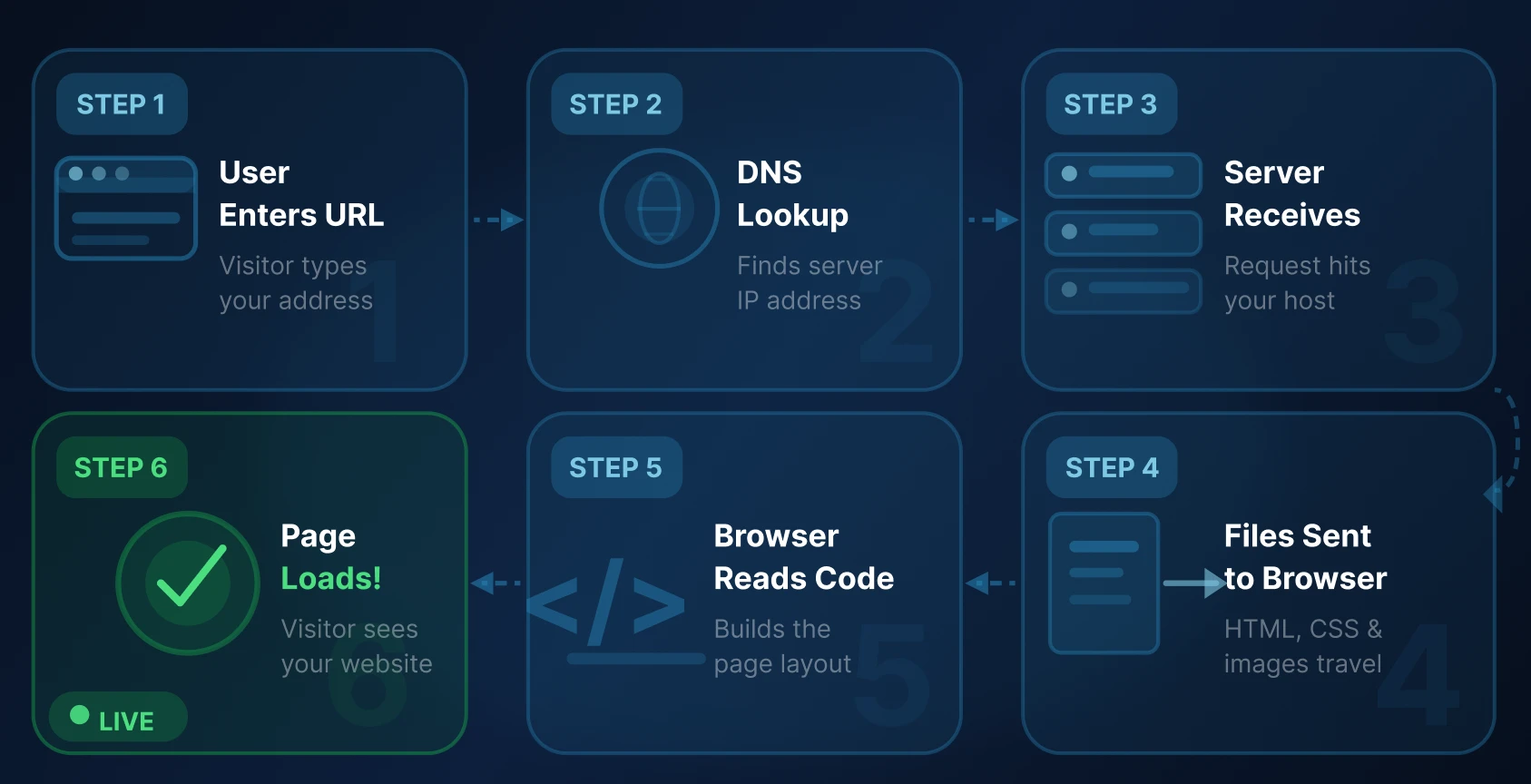
A Simple 6-Step Visual Guide for Business Owners
Every business needs a website. Very few business owners know what actually happens when a customer types your address and hits Enter. It is not magic — it is a fast, structured process that plays out in under a second.
This visual guide breaks it into 6 clear steps. Plain language. No technical jargon.
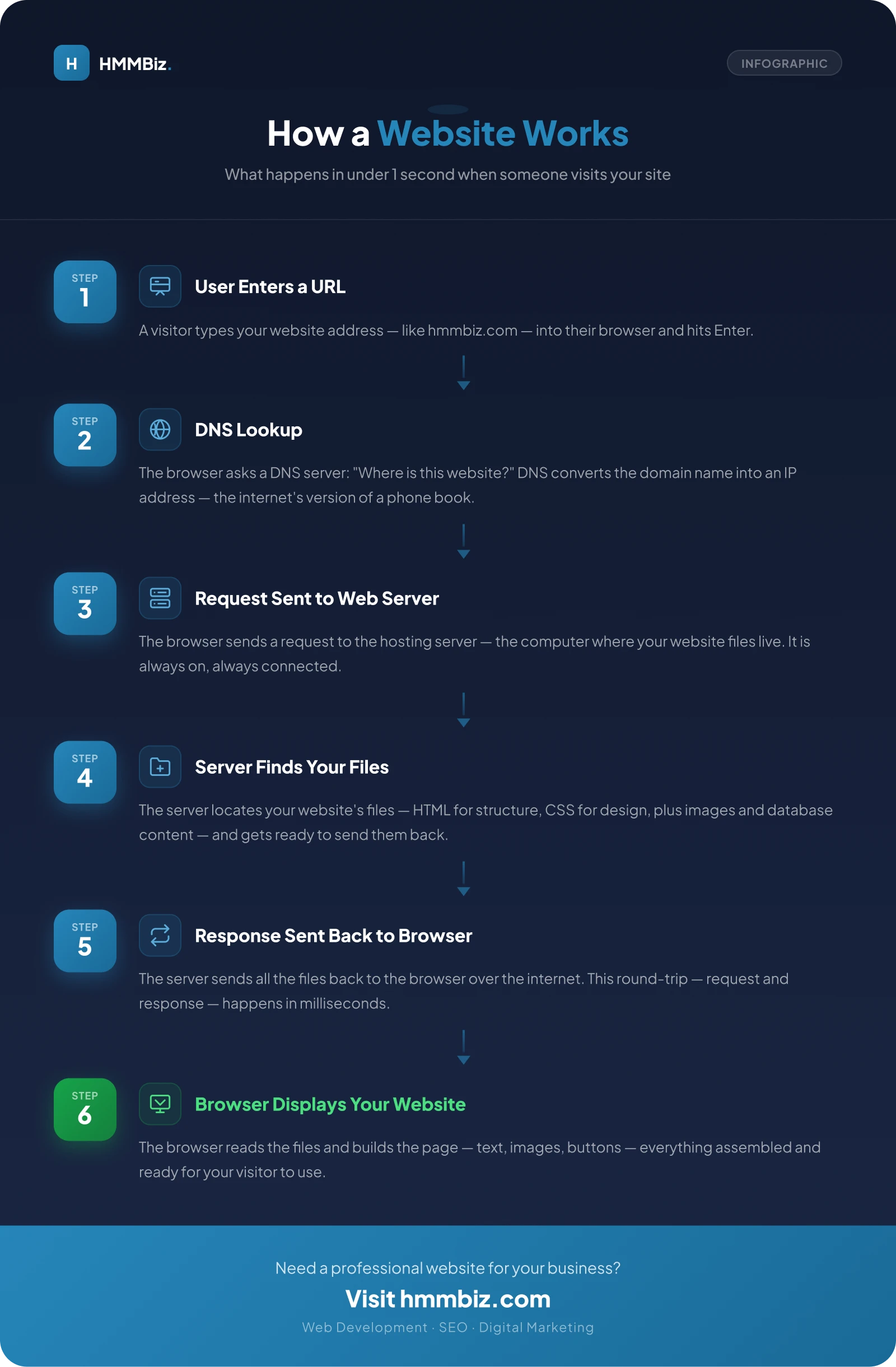
Download This Infographic
Save this visual and share it with your team or clients.
Download PNG InfographicInfographic by HMMBiz IT Services · hmmbiz.com · Free to share with attribution
What Each Step Means for Your Business
HMMBiz offers a full suite of performance marketing services to help your business acquire customers efficiently and grow revenue predictably.
Your Domain Is Your Business Address
When someone types your domain name, they are essentially calling your business. Your domain — like hmmbiz.com — is your identity online. Without a clear, memorable address and proper DNS setup, customers cannot find you. Domain selection and configuration matter from the start.
DNS Is the Internet’s Directory
DNS stands for Domain Name System. It works like a phone book — it translates a human-readable domain name into a numerical IP address that computers use to locate your server. Every website has a unique IP address. DNS is what makes it possible for people to type names instead of numbers.
Web Hosting Is Where Your Site Lives
A hosting server is a powerful computer connected to the internet around the clock. It stores all your website files and responds to visitor requests instantly. The quality of your hosting directly affects site speed, uptime, and security. Poor hosting is one of the most common reasons business websites underperform.
Your Website Is Built From Files
Every website is made of files. HTML creates the structure and layout. CSS controls the visual design and colours. JavaScript adds interactions. Databases store dynamic content like products or blog posts. A well-built website organises these files efficiently so the server retrieves and sends them fast.
Speed Is a Business Decision
The round-trip from browser request to server response should happen in under 200 milliseconds. What slows it down: oversized images, weak hosting, too many third-party scripts, no caching. Site speed is a direct Google ranking factor — a slow website loses both visitors and search visibility.
Different Browsers Build Pages Differently
Once the files arrive, the browser assembles the page. Chrome, Safari, Firefox, and Edge each do this slightly differently. Professional web development includes cross-browser testing to make sure your site looks right everywhere — not just on your own laptop.
Is Your Business Website Actually Working?
Most business websites look fine but have slow hosting, poor structure, or technical gaps that hurt Google rankings. HMMBiz builds and audits websites that load fast, rank well, and turn visitors into customers.
Frequently Asked Questions
What actually happens when I type a website address and press Enter?
Your browser sends a request through DNS to find the server that hosts that website. The server sends back the website files — HTML, CSS, images — which your browser reads and displays as the page you see. On a well-built website, this whole process takes under a second.
What is web hosting and do I need to pay for it?
Web hosting is the server that stores your website files and keeps them available online at all times. Every website needs it. Free hosting exists but comes with real limitations — slow speeds, no custom domain, limited storage, and unreliable uptime. For a business website, proper paid hosting is worth it.
Why does my website sometimes load slowly?
The most common causes are oversized images, weak hosting, too many third-party scripts, and no caching in place. Google tracks load speed and uses it as a ranking factor — so a slow site costs you both visitors and search positions. HMMBiz identifies and fixes performance problems as part of its web development and maintenance work.
What is DNS and can it affect my website?
DNS connects your domain name to your hosting server. If it is misconfigured, your website will not load — or will load unreliably in different regions. DNS records also control your email delivery. HMMBiz sets up DNS correctly as part of every new website project.
What is the difference between a website and a web application?
A website displays information — pages, content, contact forms. A web application is interactive and processes user actions, like an e-commerce store, a booking system, or a client portal. Both are delivered through the browser in the same way, but web applications are significantly more complex to build and maintain.
Does HMMBiz handle web hosting as part of development?
HMMBiz advises on hosting and helps configure it as part of every website project. We work with enterprise-grade providers to make sure your site has the speed, uptime, and security your business needs. Email [email protected] to talk through the right setup for your project.
How long does it take to build a professional business website?
A standard business website with HMMBiz takes 3 to 6 weeks, depending on scope, content readiness, and design complexity. E-commerce sites and custom web applications take longer. Every project starts with a clear timeline. Call +1 862-246-6249 for a scoping conversation.
How is HMMBiz different from a freelance web developer?
HMMBiz is a full-service IT company, not a single developer. Every website project covers strategy, design, development, testing, SEO setup, and post-launch support — handled by a team across India, the USA, the UK, Australia, and the UAE. A freelancer delivers a website. HMMBiz delivers a complete digital asset.
Ready to Build a Website That Works From Day One?
HMMBiz builds professional business websites from the ground up — fast, secure, and set up for Google from the start. We work with businesses across India, USA, UK, Australia, and UAE.

 +1 862-246-6249
Infographic by HMMBiz IT Services · hmmbiz.com · Free to share with attribution
Recent Infographics